Act as a World-Class Senior Frontend Engineer and UI/UX Designer.
I need you to build a complete, deployable React application called **"DBT Retro - AI Reflection Mentor"**.
### 1. Project Overview & Tech Stack -**Framework**: React 18 + Vite + TypeScript. -**Styling**: Tailwind CSS (Use a clean, modern, card-based aesthetic with Slate/Brand colors). -**AI Integration**: Google GenAI SDK (`@google/genai`) using `gemini-2.5-flash`. -**Icons**: `lucide-react`. -**Utils**: `html-to-image` for exporting screenshots. -**Deployment**: Ready for Vercel (include `vercel.json`).
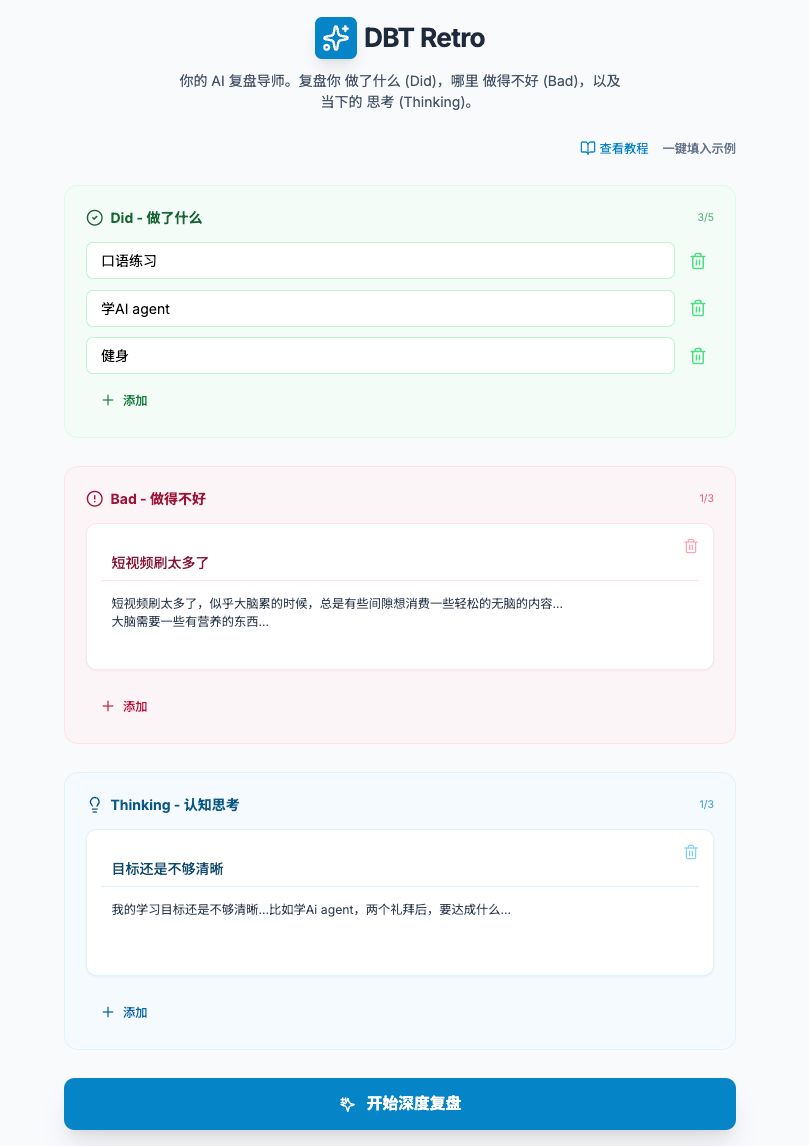
### 2. Product Philosophy: The DBT Framework The app is based on the "Did / Bad / Thinking" reflection method: 1.**Did (Context)**: A simple list of tasks completed (Max 5 items). AI uses this only for context. 2.**Bad (Behavioral)**: Negative behaviors or habits. Requires **Title** + **Description**. (Max 3 items). 3.**Thinking (Cognitive)**: Mental blocks or cognitive struggles. Requires **Title** + **Description**. (Max 3 items).
### 3. Key Features & Requirements
#### A. User Input Form (`ReflectionForm.tsx`) -**Did Section**: Simple input list with "+" add button. Green theme. -**Bad/Thinking Sections**: Complex inputs. Each item has a Title input and a Description textarea. Red theme (Bad) and Blue theme (Thinking). -**Constraints**: - "Did" max 5 items. - "Bad" & "Thinking" max 3 items (Quality over quantity). -**Template Button**: A "Fill Example (一键填入示例)" button that populates the form with specific Chinese placeholder data (detailed below). -**Tutorial Link**: Add a link next to the template button: `https://www.believed-breadfruit.top/2025/11/22/2025-11-22-%E4%B8%80%E4%B8%AAai%E6%9E%81%E7%AE%80%E5%A4%8D%E7%9B%98%E6%80%9D%E8%B7%AF/`
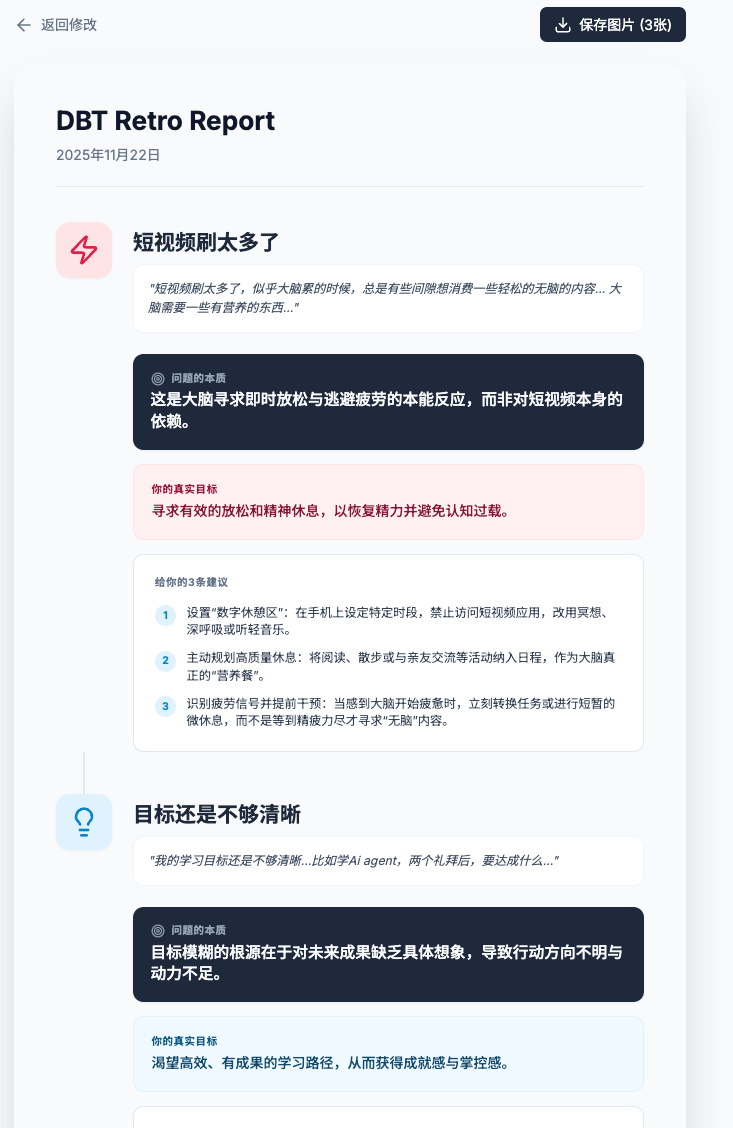
#### B. AI Analysis Logic (`geminiService.ts`) -**API**: Use `process.env.API_KEY`. -**Persona**: "Personal Mentor". Tone: Direct, Honest, Profound, Friendly (NOT academic/scientific). -**Logic**: - Analyze each "Bad" and "Thinking" item individually. -**Input**: Context from "Did", items from "Bad" & "Thinking". -**Output JSON Schema**: -`related_item_id`: To match analysis to the specific user input. -`essence`: "The Essence" (问题的本质) - One profound sentence explaining *why* this happened. -`true_goal`: "True Goal" (真实目标) - What the user was subconsciously trying to achieve. -`suggestions`: Exactly 3 core, actionable suggestions. -`encouragement`: A global closing encouragement. -**Language**: Detect language automatically, but app defaults to Chinese.
#### C. Analysis Result View (`AnalysisView.tsx`) -**Layout**: - Display current date prominently. - Render cards for each analyzed item. - Cards should show the User's Title/Description at the top, followed by the AI's Essence, True Goal, and 3 Suggestions. -**Export Feature**: A "Save as Images" button. When clicked, it must download **3 separate PNG files**: 1. Full Report (AI + User Content). 2. AI Analysis Only. 3. User Reflection Content Only.
#### D. Global & Footer - Default Language: Chinese ('zh'). Remove language switcher UI, but keep structure clean. - Footer: "Powered by Gemini 2.5 | My Xiaohongshu". -**Xiaohongshu Link**: `https://www.xiaohongshu.com/user/profile/5d17984f0000000012021c90`